
Internet Principles
The principles of the internet and technologies that underpin its existence
How does the internet work?
To understand the internet, it helps to look at it as a system with two main components
- Hardware, that includes everything from the cables that carry terabits of information, routers, servers, cell phones towers, satellites, radios, smartphones and other devices. These elements are connections, some are end points we call them clients and the machines that store the information we seek on the internet we call them servers. Another element calls nodes which serve as a connection point along a route of traffic as well as the transmission lines which can be physical as cables and fibre optics
- Protocols, which are sets of rules that machines follow to complete tasks, like hypertext transfer protocol (HTTP), transmission control protocol (TCP) and Internet protocol (IP). These protocols establish the rules for how information passes through the internet, without these rules, we would need direct connections to other computer to access the information they hold
Operating system Vs networking operating system
The network operating system is the platform to run a system software on a server and allow the server to manage the users, data, groups, security, application and other networking function.
The operating system is software that manages computer hardware and software. So there are no big differences between both of them.
The features and function of a NIC
NIC (network Interference Card) function is between the computer and data network. Basic computer networks share common devices, functions and features including servers, clients, transmission media, shared data, shared printers and other hardware and software resources
The functionality and features of Microsoft Widows to monitor major functional components of a computer or server
CPU: Monitor Processor performance
MEM: Monitor Memory Performance
HDD: Monitor physical disk Performance
NIC: Monitor networking Performance
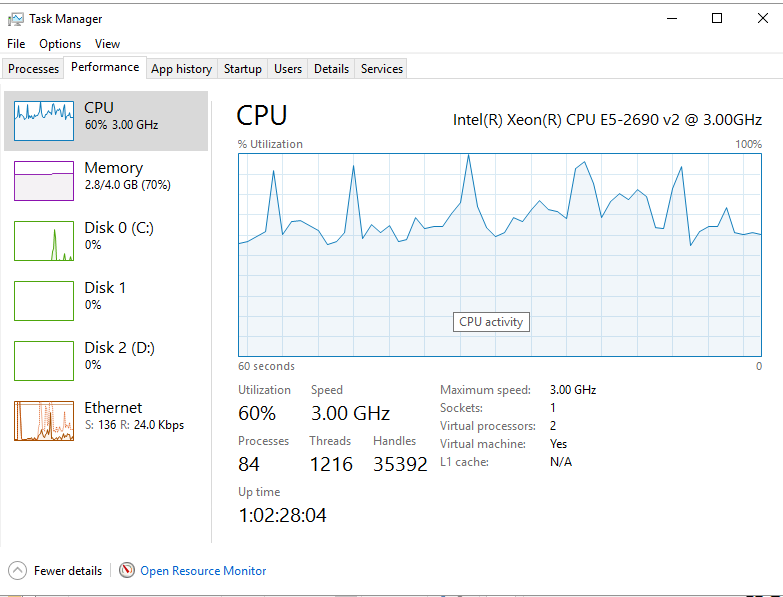
The picture below illustrates how to monitor them together and how they perform, task manager allows us to know important information about either personal PC for work purpose, what the percentage of CPU and if it works fast or slow, how much memory we used, the capacity of HDD and NIC performance.
In the Microsoft ware there are 2 applications managers;
1) task manager which is monitor computer CPU, MEM, HDD and NIC as example image below:
We can monitor our PC task manager by click on ctrl+alt +delete and choose task manager
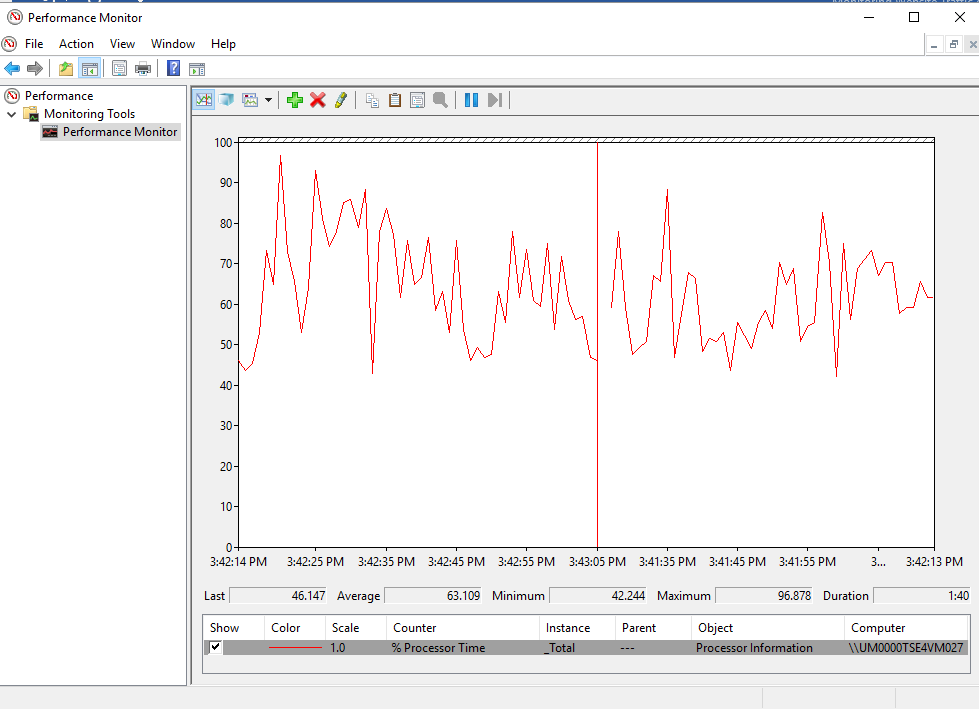
1) Performance Monitor which allows us to monitor the 4 components while we use and open any apps on the PC.
The functionality and features of suitable software or application to monitor Internet speed performance of ISP?
In order to monitor internet speed we go to www.speedtest.net and choose the region, then click go. The picture below illustrates how to test the speed and performance of the internet connection.
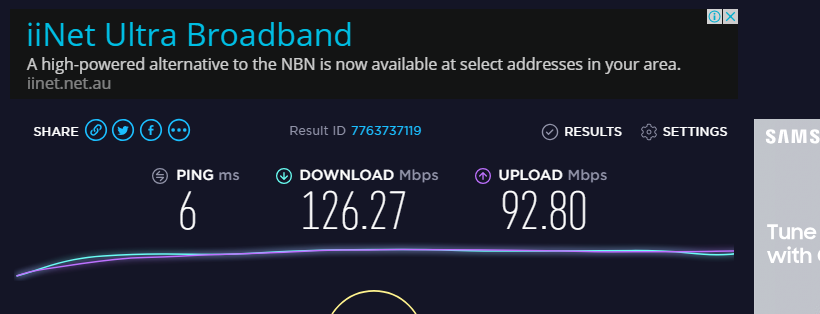
I have been monitoring TAFE NSW internet for 2 different days, in the table below, the outcomes of this experiment;
| Location | Date/Time | Ping (Ms) | Download (Mbps) | Upload (Mbps) |
| Ultimo TAFE NSW | 18/10/2018 | 3 | 100 | 75.60 |
| Ultimo TAFE NSW | 01/11/2018 | 6 | 126.27 | 92.80 |
Ping means how fast you get the respond after you send out the request.
Download speed means how fast you pull data from the server to you
Upload speed means how fast you send data from you to others
List four benefits for using a monitoring software/ application
Get your life back, no more late nights in the data center, and stay control of your IT system 24/7 whether you are at home or office, no install, reinstall and update. Just login and start monitoring.
Make your life easier and less stressful, all in one monitoring solution, all your websites, servers, networks and apps from one easy and intuitive dashboard.
Grow your business and boost your ROI, avoidprofit-killing problems, such as poor site performance or outage
See your issues before your clients or bosses do, with the proactive alerts and insightful report.
The following functionality and features of suitable software or application to
Monitor the uptime of a website meaning
Check availability and response time of the websites, apps, cloud and hosted services with easy to use tool, it critical tool for the website, test and make sure your website is available every minute from all locations. Some of the features are 30+ check locations, multiple protocols such as HTTP, HTTPS, PING, DNS, and email checks using SMTP and IMAP protocols.
Cloud based meaning
No software or hardware is needed, in just minutes, you’ll be up and running with round the clock uptime monitoring services
Monitor the full-page load meaning
A slow loading website can cause customers’ dissatisfaction and can kill the business, monitor full page load monitoring will track the loading times of the website from beginning to end, keep user experiences optimized and improve ROI by monitoring the load time, some of the features are breakdown of page loads per components, load times of all images on the websites
Monitor the transaction meaning
Monitoring service ensure e-commerce engine is functioning properly. Simulate an end users’ interaction with the website. Some of the key features are user experience simulation from over 30+ locations worldwide, ready to use templates for used transactions and visualization of each individual step’s performance.
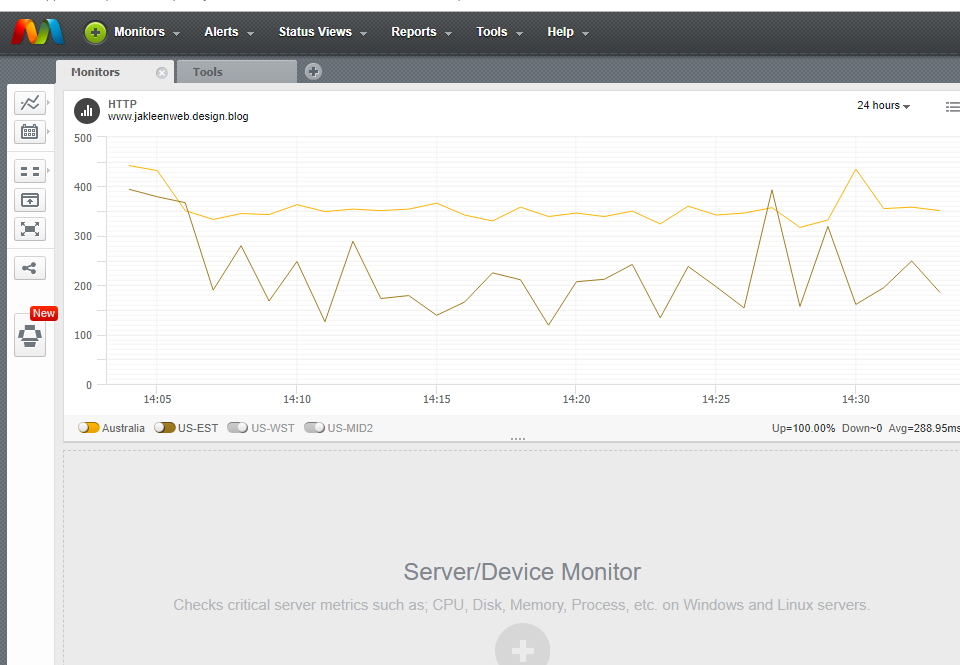
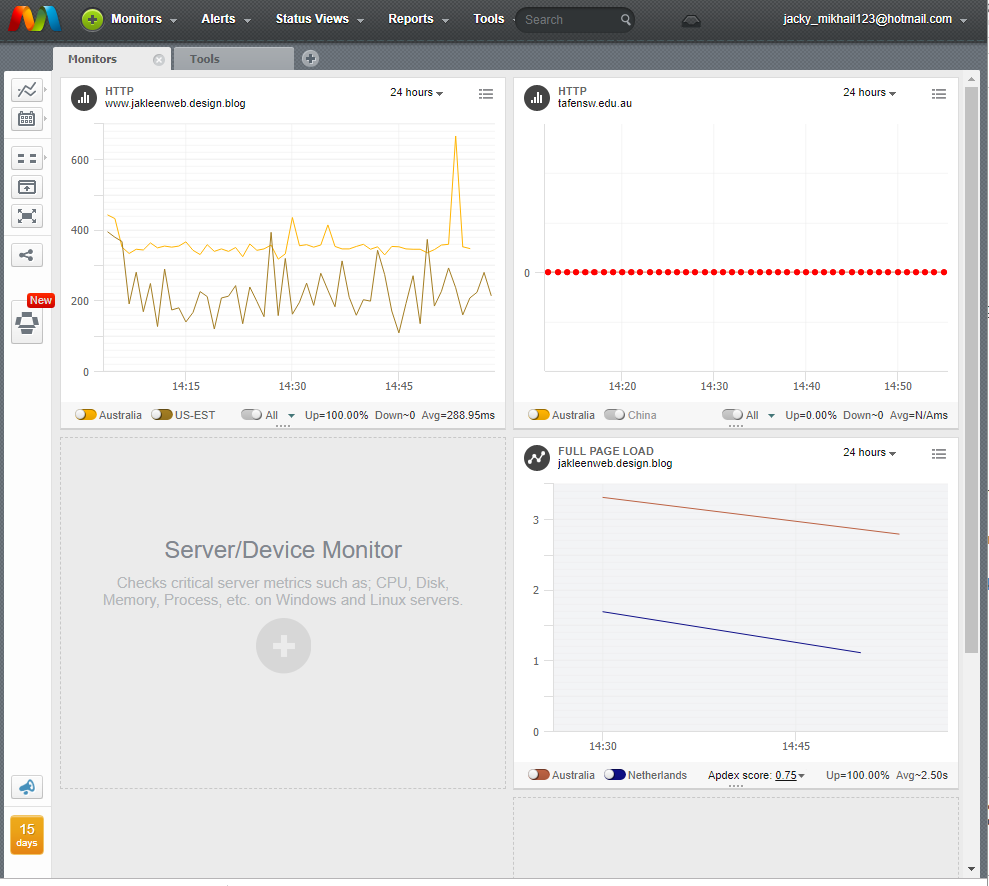
Below some of screen shots when I was monitoring my technical journal portfolio, www.jakeenweb.design.blog
 Jakleen Web Designer